

MCP
Bring Microburbs property data into Claude, Cursor, and other LLM agents via the Model Context Protocol.
Works with
Any MCP-compatible client — Cursor, Codex, Continue, Zed, or your own agent.
Hosted endpoint
One URL, no install. Point any MCP client at it and authenticate with your Microburbs API key (Authorization: Bearer). Same key, same plan, same per-call metering as the REST API.
https://api.microburbs.com.au/mcpNo key yet? Create one under Keys. Keys look like mib_live_….
Set it up
You need two things, whichever app you use: the address below, and your API key. It is a five-minute job and you do not need to install anything.
Using Claude? Start on the first tab — that is the one for you. The rest are for coding tools.
For claude.ai in your browser, or the Claude desktop app. Nothing to install and no coding. Once it is set up you just ask Claude for a suburb or property report in ordinary English.
1. Settings → Connectors → Add custom connector.
2. Name it Microburbs and paste the URL: https://api.microburbs.com.au/mcp
3. Under Authentication, choose None.
4. Under Request headers, add one: name authorization, value Bearer mib_live_… — your key with Bearer and a space in front of it. The value is sent exactly as typed, so the word Bearer has to be there.
No key yet? Put Bearer test in as the value and the connector works straight away on our free sample: nine suburbs — Bondi, Belmont North, St Kilda (Vic.), Fortitude Valley, Subiaco, Unley, Sandy Bay, Kambah and Nightcliff — plus one sample property in each state. Everything else answers “not in the public sandbox” until you add your own key. The header does have to be there; an empty one is refused.
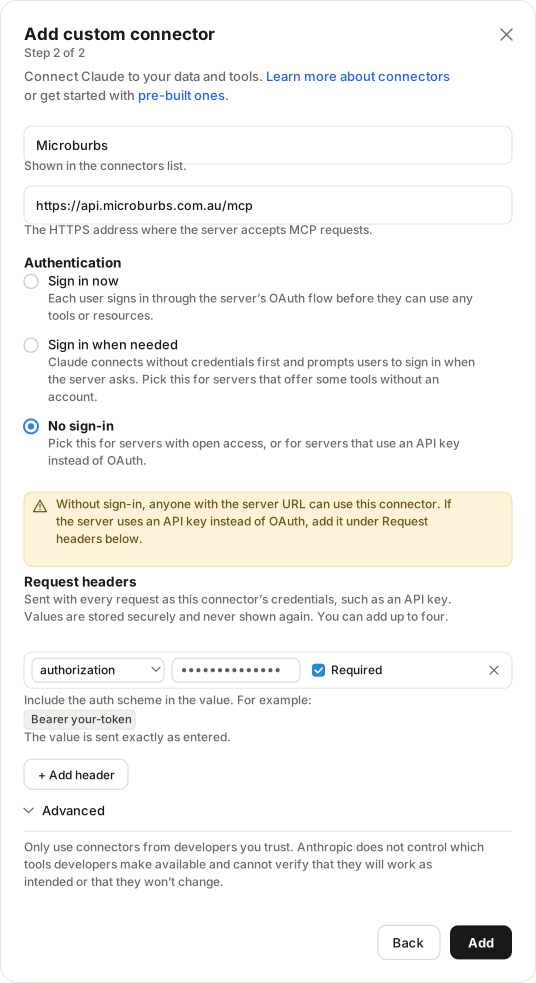
authorization header. The amber warning is expected.5. Add. Back on the Connectors screen you should now see Microburbs with its tools listed under it — that is how you know it worked.
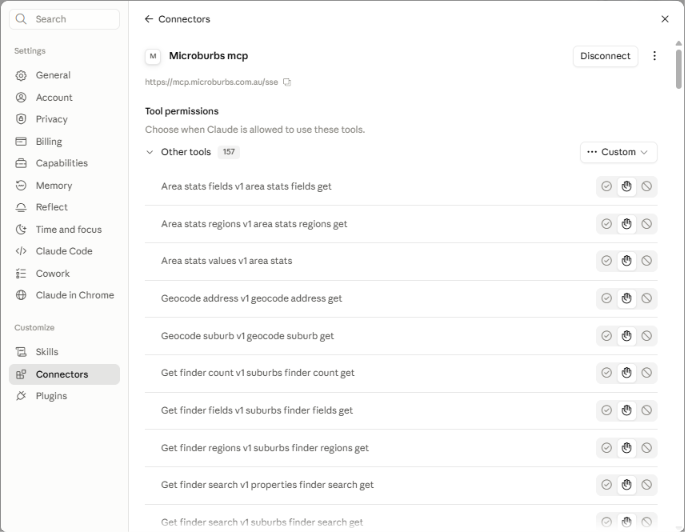
6. Start a chat and ask for a suburb report.
Not listed? Any client that speaks MCP over HTTP works the same way: server URL https://api.microburbs.com.au/mcp, plus an Authorization: Bearer mib_live_… header. There is no OAuth — the key is the whole of the auth.
Tools
Every Microburbs API endpoint is exposed as a native tool — property reports, suburb reports, AVM valuations, CMA comparables, risk overlays, schools, development & zoning, market data, and the Suburb Finder. Tools are generated straight from our OpenAPI spec, so the tool list always matches the API.
Browse the full endpoint reference →Why MCP
MCP is the emerging standard for connecting LLMs to external tools and data. Instead of building a custom integration per agent, any MCP client can discover and call our endpoints as first-class tools. That means:
- Claude can pull a suburb report mid-conversation without leaving the chat.
- Agentic workflows (lead qualification, portfolio analysis) wire up in minutes, not days.
- Same API key, same plan — MCP is just another transport.
Get a key and start calling
Mint an API key, point your client at the endpoint above, and your agent has property data in one step.