One list per client of every property you are weighing, tagged and commented, with the full Microburbs report behind each. When the client calls or emails, your current view and reasoning are together.
 By Luke Metcalfe · Founder, Microburbs
Watchlists comes with your Microburbs plan, live in your member area now. Already a member, open your lists. New to Microburbs, see the plans and start today.
You run searches across a stack of tools. You inspect, you rule places out, you keep private notes on each one. Your client sees none of it.
So they email you a link. "Did you see this one?" You did. You looked at it three weeks ago and passed on it for a reason. Now you write that up again. With one current list for that client, you can answer from the work you already recorded instead of rebuilding it.
Watchlists gives you one named list for each client. Save any property or suburb to it, add a comment, tag it, and group the list by suburb. It is live in your member area now, with the full Microburbs report behind every property you add.
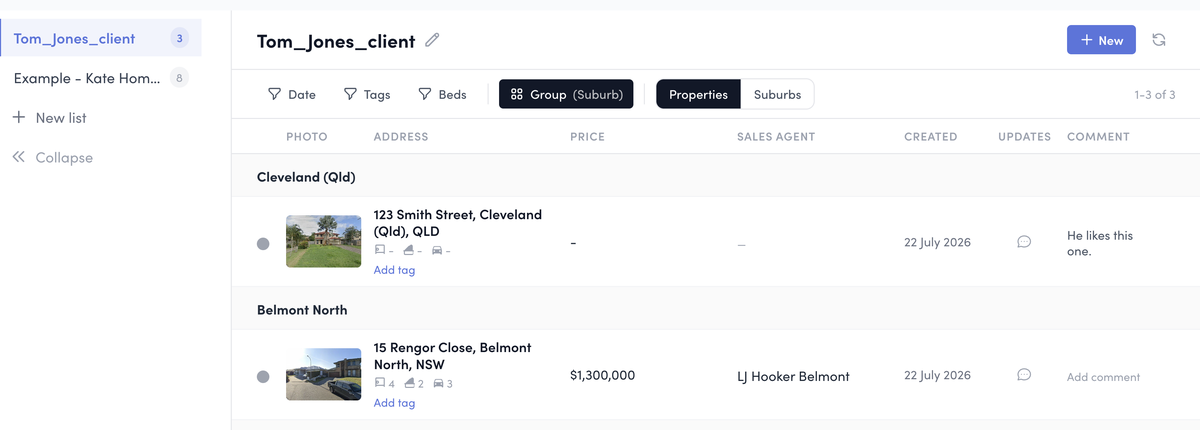
One list per client, on your working board. Save a property, add your comment and tags, and group by suburb. Your comments stay private to you.
| Property | Your comment | Tag |
|---|---|---|
| 3-bed house, Bardwell Valley (Sydney) | Inspected 18 Apr. Retaining wall needs work, north-facing yard. Good buy under the guide. From our property report: your value range, backed by Microburbs evidence, so you can see it against the guide. | strong fit |
| Townhouse, Bardwell Valley (Sydney) | Strata levies high, busy road. Passed for this client. | busy road |
| Unit, Belmont North (Newcastle) | Waiting on the building report before I call it. | awaiting report |
The job is not a spreadsheet of properties. It is one shortlist per client, grouped the way you will talk them through it, with your reasoning on every one. Watchlists is built around that.
Each client gets their own named list. Save the suburbs and properties that fit their brief, so a client buying in Sydney and a client buying in Queensland never get mixed up.
Group by suburb and use tags for top picks, places still being reviewed, or homes you ruled out. The grouping and tags line the list up the way you would walk your client through it.
A short comment on each, why it is a good buy, why you passed. That judgement is the part a client is really paying you for, and it stays with the property.
The full Microburbs report sits behind each property. You choose which property report to share with the client.
Each property you save keeps the full Microburbs suburb and property report behind it, one tap away. It is the depth you already work from, now sitting on the list.
The Save to List button on any suburb or property report saves it to a client's list. Live in your member area today, organised per client, with your comments and tags.
One tap on any saved property opens its full Microburbs suburb and property report, the same depth behind every home on the list.
The live reports behind each saved item, actual product. The depth comes from two Microburbs reports that already run across Australia. The property-report link below opens the live 15 Rengor Close page. The suburb side is labelled from the saved Belmont North capture.
From our captured Belmont North suburb report.
Open our 15 Rengor Close property report.
A shortlist tells you what is on the list. A Microburbs shortlist shows you why. A workflow can be copied. The depth of the suburb and property reports behind every home on the list is far harder to match, and it sits next to every property you save.
Track every property you are considering for a client on one list, instead of a spreadsheet that never keeps up.
A comment and a tag on each property, so the ones you ruled out and the ones you are still checking are all recorded.
Group the list by suburb, and switch between the properties and the suburbs you are tracking.
The full Microburbs suburb and property report sits behind every property on the list, one tap away.
One list instead of the stitched-together job. Buyers agents told us they stitch tracking together across several tools. Watchlists is the one list, with the Microburbs research already behind each property.
| Today | With Watchlists |
|---|---|
| A shortlist spreadsheet. Reports opened one by one. Notes scattered around. Nothing grouped. | One list per client, research behind each property. |
Microburbs has spent years building deep data on suburbs and properties right across Australia, the kind that usually sits behind expensive enterprise tools. Watchlists puts that data into a buyers agent's everyday work, so the list you keep for each client already has the research behind every property.
Watchlists is a Microburbs feature, not another subscription to bolt on. It sits alongside the suburb and property reports you already use, and it is live in your member area now.
Save any suburb or property to a list, add your comment and a tag, and the full Microburbs report is behind every one. It comes with your Microburbs plan.